- Dwight Zahringer
- October 4, 2023


Yes, HubSpot is a CMS. Known as HubSpot Content Hub (formerly CMS Hub), this content management system lets businesses build, manage, and optimize websites without relying on separate tools for every task.
Most marketing teams know HubSpot as a CRM or an email marketing platform, but it has offered website content management tools for years. Content Hub goes beyond publishing web pages by connecting your website content directly to HubSpot’s CRM and broader customer platform.
For marketing teams that want to build, update, and grow a website while keeping their content and customer data connected, Content Hub is a compelling option.
What HubSpot CMS Actually Is
HubSpot Content Hub is a content management system integrated with HubSpot’s customer platform. It gives businesses the tools to create and manage website pages, landing pages, blogs, and other digital content while connecting those assets to their CRM.
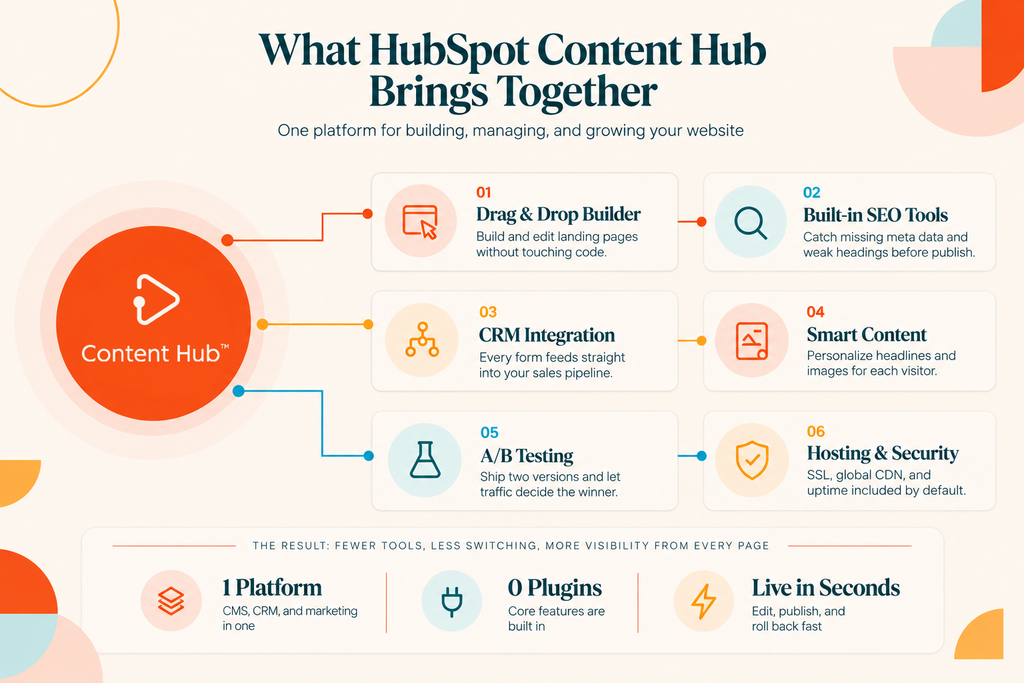
Marketers can edit pages using a drag-and-drop editor, publish blog posts, follow built-in SEO recommendations, and analyze website performance without switching between multiple platforms. Because Content Hub connects with HubSpot’s CRM, businesses can also use customer data to personalize content and better understand how visitors interact with their website.
You may still hear it called HubSpot CMS or CMS Hub, but the current product name is Content Hub. The same underlying approach applies to website management, with expanded content creation and optimization capabilities.
The Benefits of Using HubSpot Content Hub
One of the biggest benefits of Content Hub is having your website and CRM connected within the same platform. Forms, calls to action, and website interactions can feed into HubSpot’s CRM, giving marketing and sales teams a clearer picture of how visitors become leads and customers.
This connection also creates opportunities for personalization and reporting. Depending on your subscription, you can display different content based on visitor characteristics or CRM data and use attribution reporting to understand how your content contributes to lead generation and business growth. More advanced revenue attribution capabilities are available with Marketing Hub Enterprise.
HubSpot provides practical benefits, too, like managed website hosting, SSL certificates, and built-in security features, along with a global content delivery network (CDN) to support website performance. Teams can publish updates without managing their own hosting infrastructure and use version history to restore previous versions of pages when necessary.
For marketing teams without dedicated development resources, these features can make website management more efficient and reduce reliance on external technical support for everyday updates.
Key Features That Make a Difference
Several Content Hub features can make a noticeable difference in how marketing teams manage their websites.
The drag-and-drop editor allows marketers to create and update pages using reusable themes and modules without writing code. HubSpot’s SEO recommendations help identify issues such as missing metadata, broken links, and opportunities to improve on-page optimization.
With smart content, businesses can display different versions of website content based on criteria such as visitor location, device type, list membership, or lifecycle stage. This makes it possible to create more relevant experiences without building separate pages for every audience.
Content Hub Professional and Enterprise also support A/B testing, allowing teams to compare two versions of a page to see which performs better. Membership features let businesses restrict access to selected content using registration and login requirements.
Since HubSpot forms connect directly to its CRM, teams can capture leads and use that information in their marketing and sales processes without building a separate integration just to transfer form submissions.
Getting More From Your Existing Setup
Many businesses can get more value from Content Hub by reviewing how their existing website is structured, optimized, and maintained.
Start by auditing your top five to ten pages. Review their calls to action, internal links, and opportunities for personalization. Check for missing or outdated page titles, meta descriptions, image alt text, and other on-page SEO elements. HubSpot’s SEO tools can help identify areas that need attention.
Next, review your website’s structured data. Adding relevant schema markup, such as Organization, Service, or other supported schema types where appropriate, can help search engines better understand your content. Make sure the markup accurately represents what’s visible on the page and follows search engine guidelines.
Your templates are worth reviewing, too. Rather than building every landing page from scratch, consider creating two or three flexible templates with reusable modules. This gives your team room to customize campaigns while maintaining consistent branding and reducing the need for developer involvement.
Finally, establish a regular content review process. Use website analytics to identify high-performing pages, find content that needs improvement, and refresh information when it becomes outdated. Accurate, helpful, well-structured content supports traditional SEO and can improve how easily search engines and AI-powered discovery tools understand your website.
Make HubSpot Content Hub Work Harder For You
If you’re considering HubSpot Content Hub or already using it, getting the most from the platform starts with the right setup and strategy. From reusable templates and smart content to structured data and SEO recommendations, there are plenty of ways to improve how your website supports your marketing goals.
An experienced HubSpot Solutions Partner can help you identify gaps, optimize your existing setup, and use features you may not be using.
Book a free HubSpot Content Hub review with Perfect Afternoon to see where your website could be working harder for your business.
FAQs
Is HubSpot Content Hub good for SEO? Yes. HubSpot Content Hub includes built-in SEO recommendations, website analytics, managed hosting, and mobile-responsive website themes. These features provide a strong foundation for search engine optimization, but your site’s performance still depends on factors like content quality, website structure, technical configuration, and your overall SEO strategy.
Can I move my existing website to HubSpot Content Hub? Yes. You can migrate an existing website from platforms like WordPress, Squarespace, or Wix to HubSpot Content Hub. HubSpot offers tools to import certain types of content, including blog posts, but website pages, designs, and functionality may need rebuilding. Perfect Afternoon, a HubSpot Solutions Partner, can help manage the migration, recreate your templates, and preserve important SEO elements such as URLs and redirects.
Do I need to know code to use it? No. HubSpot Content Hub includes a drag-and-drop website editor, allowing marketers to create and update pages without coding knowledge. You can use prebuilt themes and modules to manage most day-to-day content changes, while developers can build custom templates, modules, and advanced functionality when needed.
Does HubSpot Content Hub work with eCommerce websites? Yes. HubSpot Content Hub can work alongside eCommerce platforms like Shopify, WooCommerce, and BigCommerce through integrations available in the HubSpot App Marketplace.
These platforms typically manage product catalogs, shopping carts, and checkout, while HubSpot supports website content, customer relationship management, and marketing activities. Depending on the integration, customer, product, and order data can sync with HubSpot CRM to support personalized campaigns and automation.
HubSpot also offers payment links, invoices, and payment processing through HubSpot payments or a connected Stripe account. These tools, part of HubSpot’s broader revenue capabilities, can support simpler purchasing experiences and service-based sales without requiring a full eCommerce storefront. For businesses needing advanced shopping carts, inventory management, or extensive online catalogs, a dedicated eCommerce platform is generally the better option.